Saved Content
As a subscriber, you can now save Bloomberg.com content across devices. Your saved content will be viewable whether you are reading in the Bloomberg News app or on Bloomberg.com.
NOTE: Saving articles across the website and app devices is a subscriber-only benefit.
To save an article on Bloomberg.com, tap the Save button.

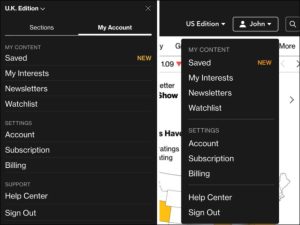
To access your saved articles on Bloomberg.com, sign in and tap on your name (or “My Account”) to find the Saved tab.
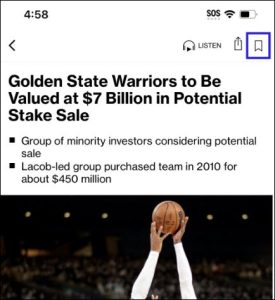
To save content on the Bloomberg app, tap on the Save bookmark icon.
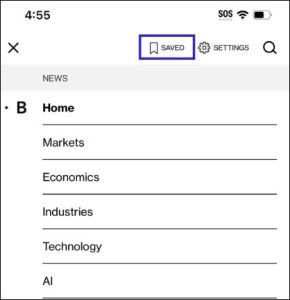
To access your saved content in the Bloomberg app, go to the MENU tab and tap on SAVED.
I have registered on Bloomberg.com, but did not subscribe. Can I save articles?
As a registered user, your saved content will not be stored across all your devices. Content you save on the Bloomberg app will only be accessible on the device you saved it on. Subscribe now to gain access to this subscriber only feature.
What happens to my Saved Content if I get a new device or uninstall/restore the app?
If you have an active subscription, you will be able to view your saved content on your new device or new app download. Please make sure to sign in with your active subscription in order to view your saved content. If you are not an active subscriber, you will lose your saved articles when on a new device or restoring the app. Subscribe now to gain access to this subscriber only feature.
If I am signed out of my account, can I still view my saved content?
In order to see articles saved to your account across devices, you must be signed in with an active subscription. If your subscription is canceled, you will only be able to see the content saved on the device.
Subscribers that are not signed in to the app can only view articles that have been saved in the app and not across multiple devices.
Can I save a video, images, charts or other multimedia content?
At this time, only articles can be saved across Bloomberg.com and the Bloomberg app.
How can I remove a saved article?
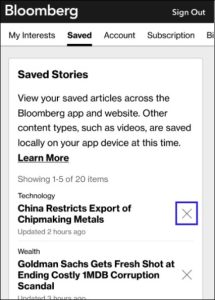
On Bloomberg.com, click the “X” next to the saved article to remove it from the list.
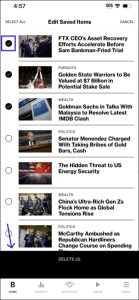
On the Bloomberg app, tap “EDIT”, select item(s) you want to remove, and tap “DELETE”.
Is there a limit to how many articles can be saved?
You are able to view up to 50 most recently saved articles. If you saved more than 50 articles and wish to see older articles that you saved, you will need to remove some recent articles in your saved list for them to appear.
I cannot see my Saved Content. What should I do?
Saving content across devices is a subscriber only benefit. Please sign in with an active subscription to view your saved content.